
Schedule Controlled Substances Checks
You can now schedule recurring checks for Controlled Substances containers, making compliance and inventory management simpler than ever. Full Admins can set up scheduled Arriving, Departing, and Inventory checks for each container, with flexible intervals—by days, specific weekdays, or calendar dates. A new "Manage Schedules" page in Settings lets you view, edit, activate, or delete schedules in one place. On the Station Home and CS Home pages, scheduled checks are clearly displayed, and users see only the checks relevant to their role and station.
Learn more about how this works here.
Note: This functionality is not currently available for agencies with a movable container configuration.
Track the User or Apparatus Supplies Items are Issued To
Supplies Users with the proper permissions can now log exactly who or what received a supply item during a usage event. In the new "Issued To" section, you can choose to assign items to a specific User or an Apparatus (vehicle/equipment) using searchable department lists. Whether you are restocking a truck or issuing gear to a team member, every transaction is now clearly documented and saved directly to your event logs.
See how to set this up here.
View Open PPE Alerts During Inspections
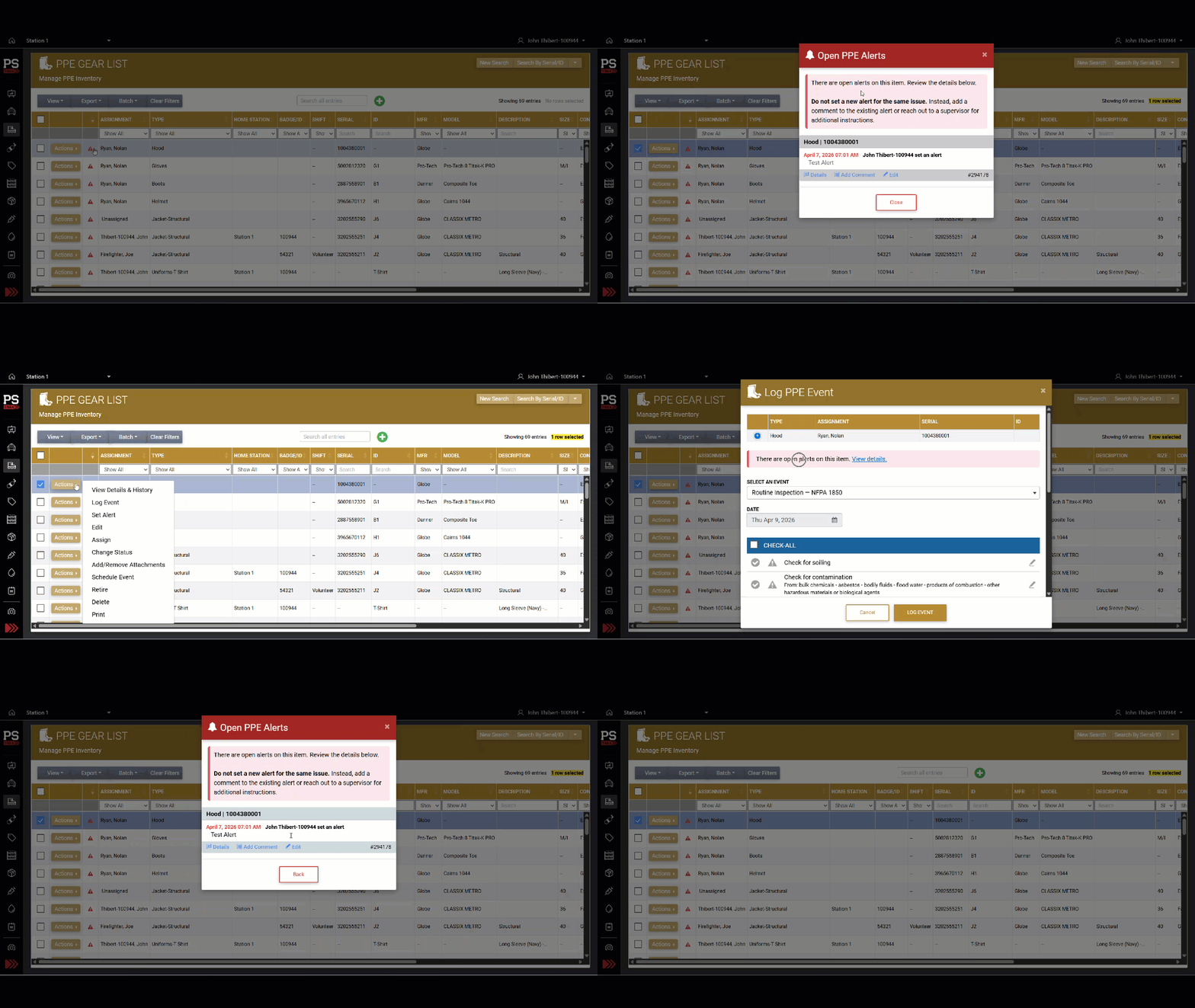
When logging an inspection on PPE that has an open alert on it, you'll now see a red alert banner with a direct link to view alert the alert details. This is designed to help users reduce duplicate alerts being set on the same item, and stay informed about gear status before logging new events. On the PPE Gear List, a red alert icon appears next to any item with an active alert—just click it to review the details.
See Expiring Stock in Below Min Report
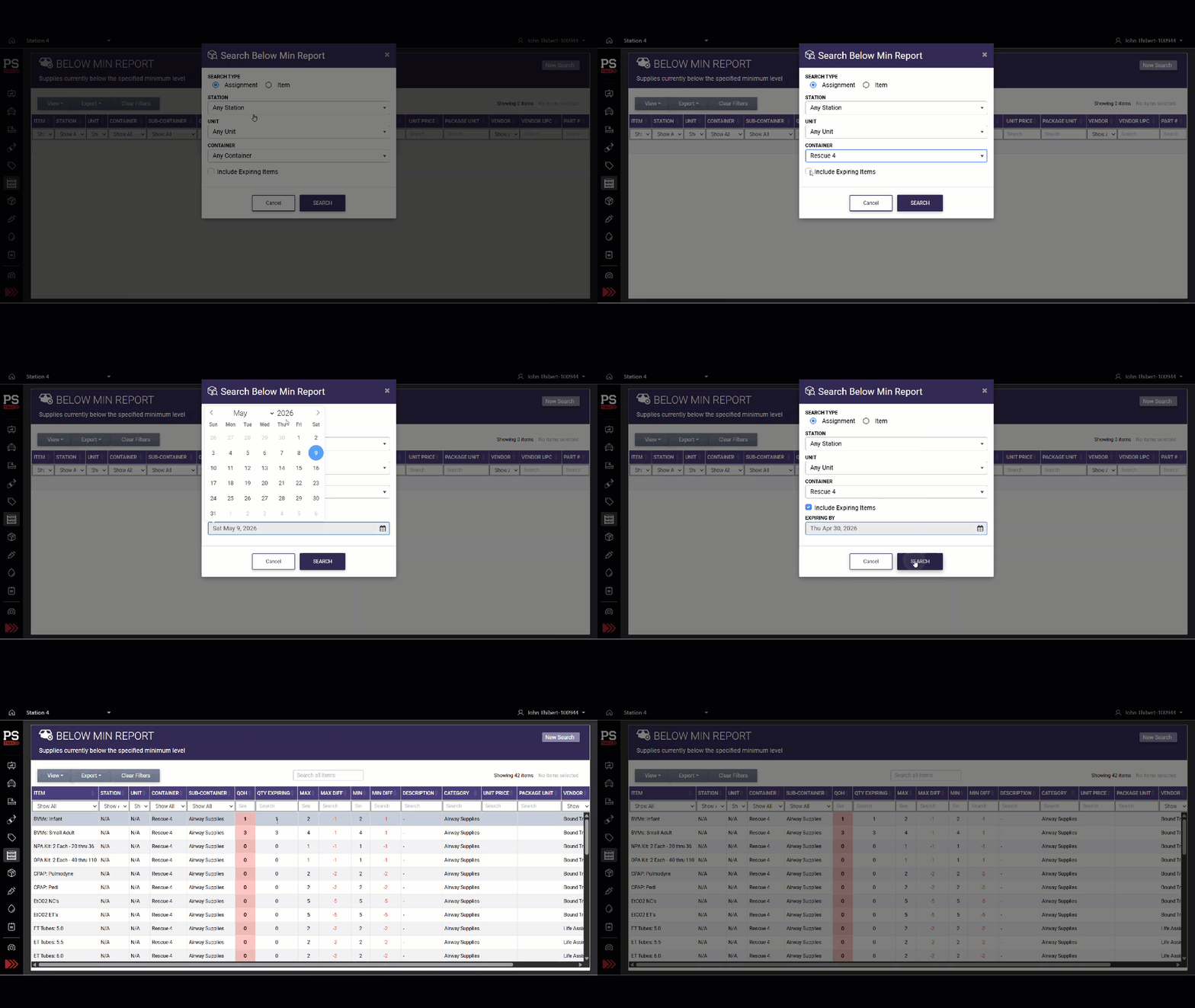
The Below Min Report now includes expiration data, letting you view both low-stock and soon-to-expire items in one report. Just check the new "Include Expiring Items" box and select a date to see a "QTY EXPIRING" column, which totals all items set to expire by your chosen date. This makes it easier to plan reorders and avoid shortages.
Capture and View Signatures on Asset Event Tasks
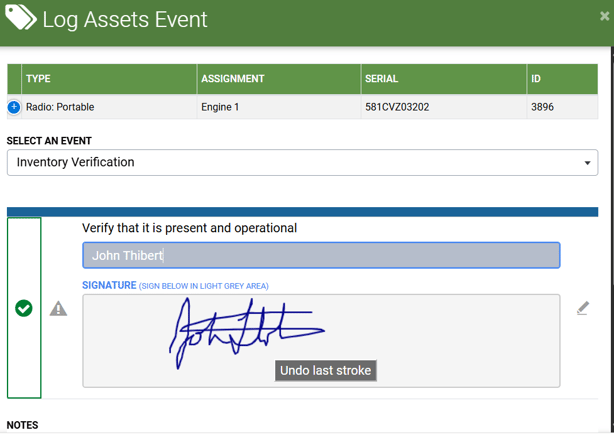
You can now capture signatures and typed names when logging asset events. Administrators can enable this feature by selecting Signature as the log notes type in the Edit Task modal. Users can sign using their finger or mouse (depending on the device being used), which are then viewable in the log history.
Other Features, Enhancements & Bug Fixes
Vehicle & Station
- Effortless Search Navigation in Edit Checklists: We fixed an issue where using the search feature on the Edit Checklists page did not automatically scroll to the highlighted result. Now, as you navigate through search matches, the page will smoothly bring each active result into view—even in long or collapsed checklists—making it much easier to find and update items.
- Users Stay Visible After Position Deletion: We fixed an issue where users would disappear from the User List if their assigned position was deleted. Now, users whose positions are removed will remain visible in the User List and be clearly marked as having "No Position." Their active status is preserved, and all active users are accurately counted.
PPE / SCBA / Assets
- Easier Sorting and Filtering on SCBA Gear List: The SCBA Gear List now features separate columns for "Last Log Date" and "Last Log Detail," making it simple to sort and filter by the most recent activity date or event description. Additionally, the "Logged By" column has been renamed to "Last Logged By" for greater clarity.
- Dropdown Menus Now Display Correctly on iPad: We fixed an issue where the "Actions" dropdown menus in the PPE, SCBA, and Assets gear lists appeared blank or with missing options when viewed on iPads. All menu items are now clearly visible and fully functional on both Safari and Chrome browsers for iPad users
- PPE Gear List Remembers Your View: We fixed an issue where your column visibility settings in the PPE Gear List would reset every time you left and returned to the page. Now, your customized view stays just the way you set it for your entire session—making it easier to manage large inventories without extra clicks.
- SCBA Admins Can Now Add Event Intervals: We fixed an issue where SCBA Admins could not see the "Add a New Interval" button unless they also had Vehicle/Station Admin permissions. Now, any user with SCBA Admin access can add new event intervals, without needing extra permissions.
- PPE & SCBA Alert Emails Now Show Correct Update Info: We fixed an issue where email notifications for updated PPE and SCBA alerts showed the wrong subject line and duplicated update notes. Now, update emails clearly state "Alert Updated," and additional comments appear only once—making your notifications clearer and more consistent with asset alerts.
Supplies & Procurement
- Lot Number Tracking Now Saves Instantly: We fixed an issue where the "Track Lot Number" option was not being saved when adding a new supply item. Now, when you select this option during item creation, your choice is immediately reflected in the item list and edit screens—no extra steps required.
- Expiration Date Report Now Waits for Your Search: We fixed an issue where the Supplies Expiration Date Report would automatically load results as soon as you opened the page. Now, the report waits for you to enter your search criteria and click "Search" before displaying any data, making the experience consistent with other reports and improving page load speed.
- Supplies Logs Now Sortable and Chronological: We resolved an issue where the Supplies Logs table displayed entries out of order and did not allow sorting by column headers. Now, log entries appear in a consistent chronological order by default, and you can easily sort by Log Date, Event, Station, Unit, or Container with a simple click.
-
Sorting by 'Logged By' Now Works Smoothly: We fixed an issue where sorting the Supply Logs by the "Logged By" column would cause the page to freeze or display an error. You can now sort your logs by user name without any interruptions.
- No More False Supply Alerts for Zero Minimums: We fixed an issue where supply alerts were being triggered for items with a minimum quantity set to zero, causing unnecessary notifications and dashboard clutter. Now, only items with a true minimum requirement will generate alerts, so you’ll only be notified when action is actually needed.
- Accurate Scheduling for Simultaneous Supply Checks: We fixed an issue where submitting supply checks at the same time from multiple devices could cause the "Next Due" date to skip ahead by more than intended. Now, the system ensures the schedule only advances once, even if several users submit checks simultaneously. If a check has already been logged, you'll see a clear message and your data will still be saved.
Blood Products
- Close and Reopen Alerts with Notifications: Blood Products Admins can now close or reopen alerts, add a required comment, and choose to notify recipients about the status change. All alert status changes are securely tracked in the audit trail, ensuring transparency and accountability.
- Exports Now Include Complete Product Details: We’ve enhanced the Excel and PDF exports from the Blood Products – Product Details & History page. Your exported files now include all key product information (such as Product Type, ID Number, Blood Type, and more) right at the top, along with complete event details. Columns for Details, Authentication, and Attachments are now fully populated, making your reports more comprehensive and audit-ready.
- Quickly Find Recipients in Blood Products Alerts: We fixed an issue where the "Additional Recipients" dropdown in the Blood Products Alert modal was not showing matching names as you typed. Now, the list filters results instantly and accurately, making it easy to select the right people—regardless of upper or lowercase letters. Clearing your search will restore the full list, and you can select multiple recipients without hassle.
-
Product Edits Tab Now Displays Data: We fixed an issue where the Product Edits tab on the Blood Products Details & History page was not showing any information. You can now view all recent edits and changes as expected.
- Accurate Tracking for Duplicate Blood Product IDs: We fixed an issue where adding multiple blood products with the same ID number during restocking would only save one item in your inventory. Now, every unit—regardless of duplicate IDs—appears as its own row, so you can track and edit each product’s details individually.
Controlled Substances
- Instantly See Container IDs in Lists and Exports: You can now view the "Container ID" for controlled substance containers directly from the main Manage Containers list—no more clicking into each record! If your department uses Container IDs, this new column will automatically appear in your table and in Excel and PDF exports, making it easier to track and manage containers at a glance.
- New "View Only" Access for Controlled Substances: We’ve added a "View Only" permission level to the Controlled Substance module. This allows designated users—such as auditors or administrators—to review logs, reports, and vial histories without the ability to make changes. All editing options are hidden for these users, ensuring data integrity while maintaining full transparency for compliance and reporting.
- No More Errors When Logging Low Inventory: We fixed an issue where completing a controlled substance inventory check with items below the required levels could cause a system error and disrupt notifications. Now, the process completes smoothly, alerts are sent to supervisors as expected, and your activity is properly logged.
- Prevented Duplicate Vial Selection in Simultaneous Events: We resolved a rare issue where two users could accidentally log the same controlled substance vial at the same time, causing inventory errors and confusing transaction logs. Now, the system checks vial availability right before logging and alerts you if a vial has already been used, ensuring accurate inventory and clear history.
Other
- "All" Filter Now Shows All Journal Posts: We fixed an issue where using the "All" filter in the Journal Archive search only displayed department-level posts, leaving out station-level entries. Now, selecting "All" gives you a complete view of both department and station posts in a single search—no more manual toggling required.