
Fleetio Integration
PSTrax has worked with Fleetio, a leading fleet maintenance and management platform, to develop an integration between PSTrax's Vehicle/Station module and Fleetio. This allows our shared customers to:
-
Create a Fleetio issue (similar to a work ticket) directly from a PSTrax vehicle alert, right as part of a normal truck check.
-
Send only the alerts they choose to Fleetio, so routine, non-fleet alerts stay in PSTrax.
-
Track each issue's progress—received, started, or completed—from a Fleet Dashboard inside PSTrax, without logging in to Fleetio.
Shared links now take you directly to your destination after login
We've added a deep-linking capability. When you click a link to a specific page in PSTrax (like a shared apparatus schedule or a notification) while logged out, the system will now remember where you were going. After you log in, you’ll be taken directly to that specific page instead of being dropped on the default home screen.
👉This update saves you time and extra clicks by ensuring that links shared by teammates or sent via email work exactly as expected, getting you to the information you need immediately.
A configurable Medical Director field for Used/Removed CS transactions
Administrators can now add an optional Medical Director field to any of the Used/Removed CS event types (Administered, Expired, Broken, Custom, Custom 2). When the field is enabled, users see a dropdown of pre-configured Medical Director names on the event — plus an "Other" option that reveals a free-text field for one-off entries — and the selection is recorded in the CS logs, vial history, and event history alongside the rest of the transaction.
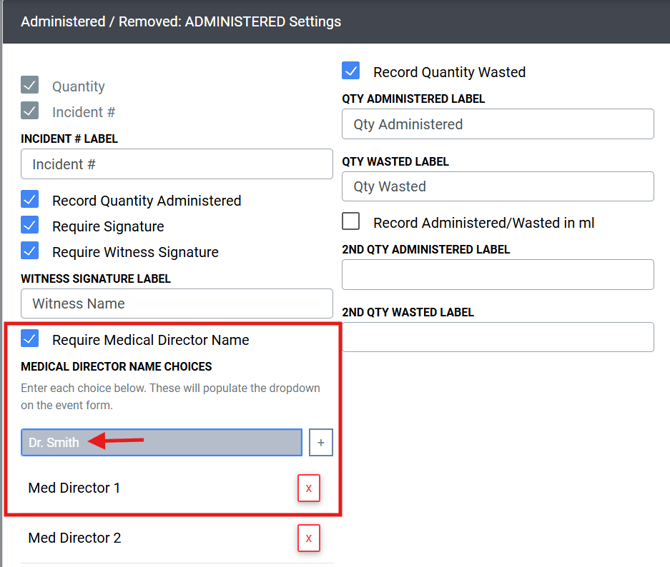
👉This addition gives departments with medical-director oversight requirements a clean, structured way to attribute each CS transaction to the authorizing physician, and it stays out of the way for agencies that don't use the field.
Other features, enhancements, and bug fixes
Vehicle & Station
- Name and Permanent ID changes now appear in Vehicle History: We fixed an issue where updating a vehicle's or station name or permanent ID on the Apparatus Details page didn't create an entry in the Vehicle History log. These changes are now recorded automatically and appear in the history table right away — with the event, the detail of the change, the timestamp, and the user who made it — no refresh required.
- Fraction characters now display correctly in scheduled checks: We fixed an issue where fraction characters like ½ were dropped from task descriptions in the Scheduled View Apparatus flow and in Vehicle Maintenance alerts — so a "2½ inch" tool could show as "2 inch" on the review and alert screens. Fractions now display accurately throughout scheduled vehicle checks and alert details, matching the As-Needed checklist workflow.
Assets / PPE / SCBA
-
The PPE Gear List "Next Due" column reads clearly: We fixed an issue on the PPE Gear List where a past-due "Next Due" value was incorrectly turned into a link to the expiration list — even though Next Due refers to the next scheduled service or inspection, not an expiration. The Next Due value now shows as plain text, with its past-due red highlight preserved, while the Exp Date column keeps its expiration link.
-
A reliable Log Event on Asset Location Verification checks: We fixed an issue where logging an As-Needed Asset Check for Location Verification could freeze on the "Wait…" state and fail to complete — specifically when marking an asset "Not Present" and entering an alternate asset ID that's assigned to a different apparatus.
Supplies & Procurement
- Working filters and search on Supplies Logs by Item: We fixed an issue where the filters and search on the Supplies Logs by Item page stopped narrowing results after a recent speed update — search terms were highlighted, but non-matching rows weren't hidden. The column filters (Logged By, Event, Station, Unit, Container), the search box, the entry count, and Clear Filters now narrow and reset the table as expected again, with the page's performance improvements intact.
- A working way to delete a Supply Vendor: We fixed an issue where deleting a vendor under Settings > Supplies > Manage Vendors greyed out the screen and froze the application, with no confirmation dialog and no way forward but a browser refresh. Deleting a vendor now opens a confirmation modal, removes the vendor on confirm, and updates the list automatically — and you can cancel to back out safely.
- Cleaner vendor stock labels on your product cards: We fixed an issue where a vendor's stock indicator could show a redundant label like "In Stock — In Stock" when the availability description simply repeated the status. PSTrax now hides the duplicate text while still showing genuinely useful detail, such as "Limited stock — call to confirm," across inventory levels product cards, the cart list, and the cart summary sidebar.
- Event attachments now stay in sync with the product details page: We fixed an issue where attachments shown in the Event details modal weren't connected to the product details page, leaving the two out of sync. Attachments now stay consistent between the modal and the product details page.
Controlled Substances
- Group and filter your CS vials by Container ID: The CS Vial List page now includes a Container ID column, positioned right next to the Container column, so departments that use container IDs can group and locate their controlled substance vials more easily. The column includes a text search field in its header for quick filtering, and it appears automatically only when one or more of your containers has a Container ID saved — so the view stays clean for departments that don't use the field.
- Return a vial to its unit without losing your place: Returning a vial to a unit from the Drug Transaction Report now happens in a modal instead of sending you to a separate page. The modal shows the destination container in bold along with the vial's details, gives you a field to explain the reason for the return, and keeps your filtered report exactly as you left it. You no longer have to re-run your search to find where you were.
- Event Tag Instructions now show up on CS Transfer events: We fixed an issue where the Event Tag Instructions for a "Transfer" event in the Controlled Substances module weren't displaying in the green instruction box, even when they'd been configured correctly. Those compliance instructions now render reliably during controlled substance transfers, matching how they already work for other events.
- A reliable Used/Removed event in the CS module: We fixed an issue where logging a Used/Removed event in the Controlled Substances module — as the first transaction on a movable-container department — could return a 500 error and log the user out, even though the transaction was actually recorded. Submitting these events now completes cleanly and keeps you in your session.
Blood Products
- "Require Notes" now works on Blood Products Add events: We fixed an issue where the per-task "Require Notes" setting was ignored on the Blood Products Add event. When an admin turns on Require Notes for a task, the notes field is now properly enforced on the Add Product step — showing the required styling and preventing the user from continuing until notes are entered — matching how the Remove event already behaves.
Developer API
- The Fleet apparatus API returns your full apparatus list. We fixed an issue where the Developer API's fleet apparatus endpoint returned only a small subset of a department's apparatus — for example, 13 of 124. The endpoint now returns the complete list of apparatus.
- The PPE inspection-logs API returns your logs again. We fixed an issue where the Developer API's PPE inspection-logs endpoint returned no records at all. The endpoint now returns your PPE inspection logs as expected.
- Accurate alert counts from the Fleet alerts API. We fixed an issue where the Developer API's fleet alerts endpoint returned too many alerts by including alerts tied to deleted apparatus. The endpoint now returns the correct count, matching what you see in the application.
- The Fleet equipment-logs API is available again. We fixed an issue that had blocked the Developer API's fleet equipment-logs endpoint. This makes department equipment-log data available again for developers building on the PSTrax API.
Other
- A working "Print" option on your export menus: We fixed an issue where choosing Export > Print on pages that use data tables — such as the CS Vial List and Vehicle & Station Logs — opened a blank tab that immediately crashed with a browser error. Print now opens a proper print preview and launches your browser's print dialog, respecting your active search, column visibility, and row filters. Excel and PDF exports continue to work as before.