
Temperature sensor integrations: automatic monitoring for your blood products
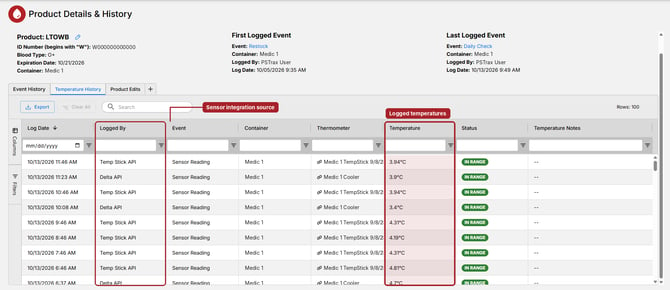
PSTrax now connects directly to temperature sensors from Delta BloodCOMM®, Temp Stick, and SensorPush. Set up your provider under Settings > Blood Products > Integrations, where each one has its own page and Quick Start guide, then link a sensor to the blood product container it monitors. From there, readings sync into PSTrax automatically on a regular schedule and are checked against the container's temperature range. Out-of-range readings can raise alerts on your Blood Products Alerts page, so a cold-chain problem reaches your team quickly, and every reading becomes part of the container's temperature record.
More control over on-truck asset checks
Departments using on-truck asset checks now have two new settings that put you in charge of how those checks behave. The first lets you choose whether each check task opens with the last asset logged in that task already selected, or starts blank every time so crews make a fresh selection. The second lets crews reassign an asset during a check: if someone logs an asset that isn't currently assigned to that apparatus, PSTrax shows a warning naming its current assignment, then moves the asset onto the apparatus when the check is logged. Each reassignment is noted in the asset's logs with a link back to the check that triggered it, so your assignments match what's actually on the truck without a separate cleanup step.
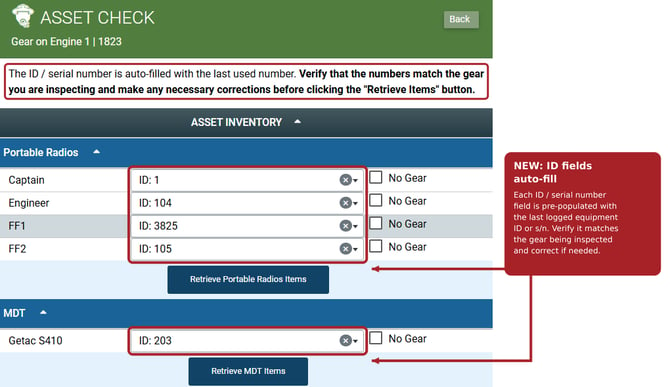
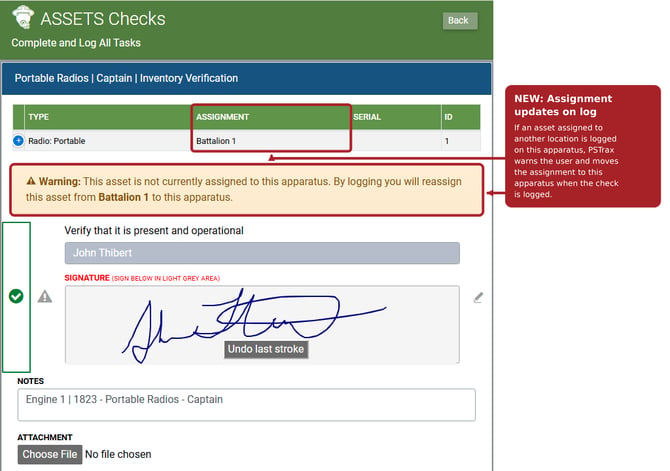
📌 Note: These features are turned off by default. To enable ID auto-fill and assignment updates on log for your department’s on-truck asset checks, contact PSTrax Support at help@pstrax.com and we’ll turn them on for you.
Developer API: update vehicles and comment on alerts
The PSTrax Developer API can now write to your vehicle details, not just read them. A new endpoint lets your integrations update an apparatus, from VIN and license plate to engine, pump, and aerial details, meters, in-service status, and location, changing only the fields you send and recording each change under the API user that made it. A second new endpoint adds a comment to a vehicle alert, appending to the alert's comment thread without overwriting its notes or earlier comments. Together they let fleet maintenance systems keep PSTrax current automatically, so shop updates and vehicle status reach your crews without anyone re-keying them.
👉Learn more about our APIs and Integrations: PSTrax API Library & Integrations
Other features, enhancements, and bug fixes
Vehicle & Station
- A Fleet Compliance Report that turns over at your local midnight: We fixed an issue where the Fleet Compliance Report rolled over to the next day's tasks at midnight UTC instead of midnight in your department's time zone. For departments west of UTC, this could reset completion to zero and show tomorrow's tasks as due hours before the day was actually over. The report now uses your department's configured time zone.
- An Incomplete Tasks Detail report that shows only critical tasks that were due: We fixed an issue where the Incomplete Tasks Detail report listed vehicle checklist tasks marked critical even when they weren't due that day, such as as-needed tasks or tasks scheduled for other days. Critical tasks now appear only when they were due and not completed. The daily DSR email is unchanged.
- Alert notifications that no longer freeze the page: We fixed an issue where viewing or acting on certain alert notifications during a vehicle check could freeze the page and require a browser refresh. You can now open and work with those alerts normally.
- PSTrax alerts reach Fleetio again: We fixed an issue where alerts set in PSTrax could fail to create matching issues in Fleetio for some departments, even while the integration showed as connected. Alerts now create Fleetio issues as expected.
Assets
- Separate Last Log Date and Last Log Event columns on your Assets gear list: The single Last Log column on the Assets gear list is now two columns: Last Log Date, which now includes the time, and Last Log Event. Each has its own header, sorting, and column filter, and Last Log Date sorts by actual date and time.
- Only active apparatus in the Add Asset dropdown: We fixed an issue where the Select Apparatus dropdown in the Add Asset window listed apparatus marked inactive or retired. The dropdown now shows only active apparatus available for assignment.
Supplies
- Usage / Transfer events that record the quantity you restock: We fixed an issue where choosing a location in the Restock from dropdown during a Usage / Transfer event locked the Unit Qty Removed field at zero. You can now enter the quantity removed, and PSTrax deducts it from the restock source location.
- Inventory Count checks that keep your counts: We fixed an issue where an Inventory Count check could fail with a "Form Failed" message and, after repeated attempts, revert Quantity on Hand to its previous count or reset it to zero. Submitted counts now save reliably.
- Set alert recipients for individual supply containers: We fixed an issue where clicking Select Recipients for This Container on the Supplies Alert Recipients page could return a 500 error for some departments. You can once again choose who receives alerts for each individual container.
Procurement
- Edit built-in products with long names: We fixed an issue where the Edit Product form disabled the Update Product button whenever a built-in product's name, supplied by the vendor catalog, was longer than 100 characters. Because that name can't be edited, the form could never be saved. You can now update other fields on these products, such as the associated supply item.
- Receive Life-Assist orders without a save error: We fixed an issue where receiving a Life-Assist purchase order could fail with "Failed to save order. Please try again.", leaving the order stuck in Open status. Received Life-Assist orders now save as expected.
Controlled Substances
- Arriving checks that return you to the check start page: We fixed an issue where submitting a Controlled Substances arriving check could intermittently send you to the Open Alerts page instead of back to the check start page. You now return to the start page after every arriving check. This fix removes a confusing detour during morning checks so crews can move straight to the next container.