
Save your pivot tables as custom views in the PPE Gear List
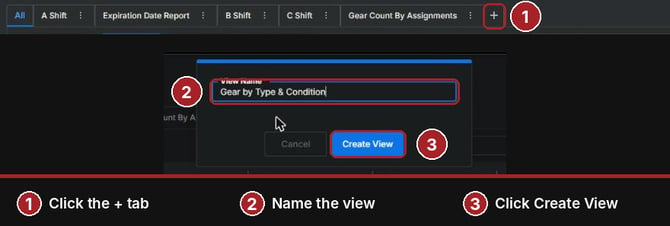
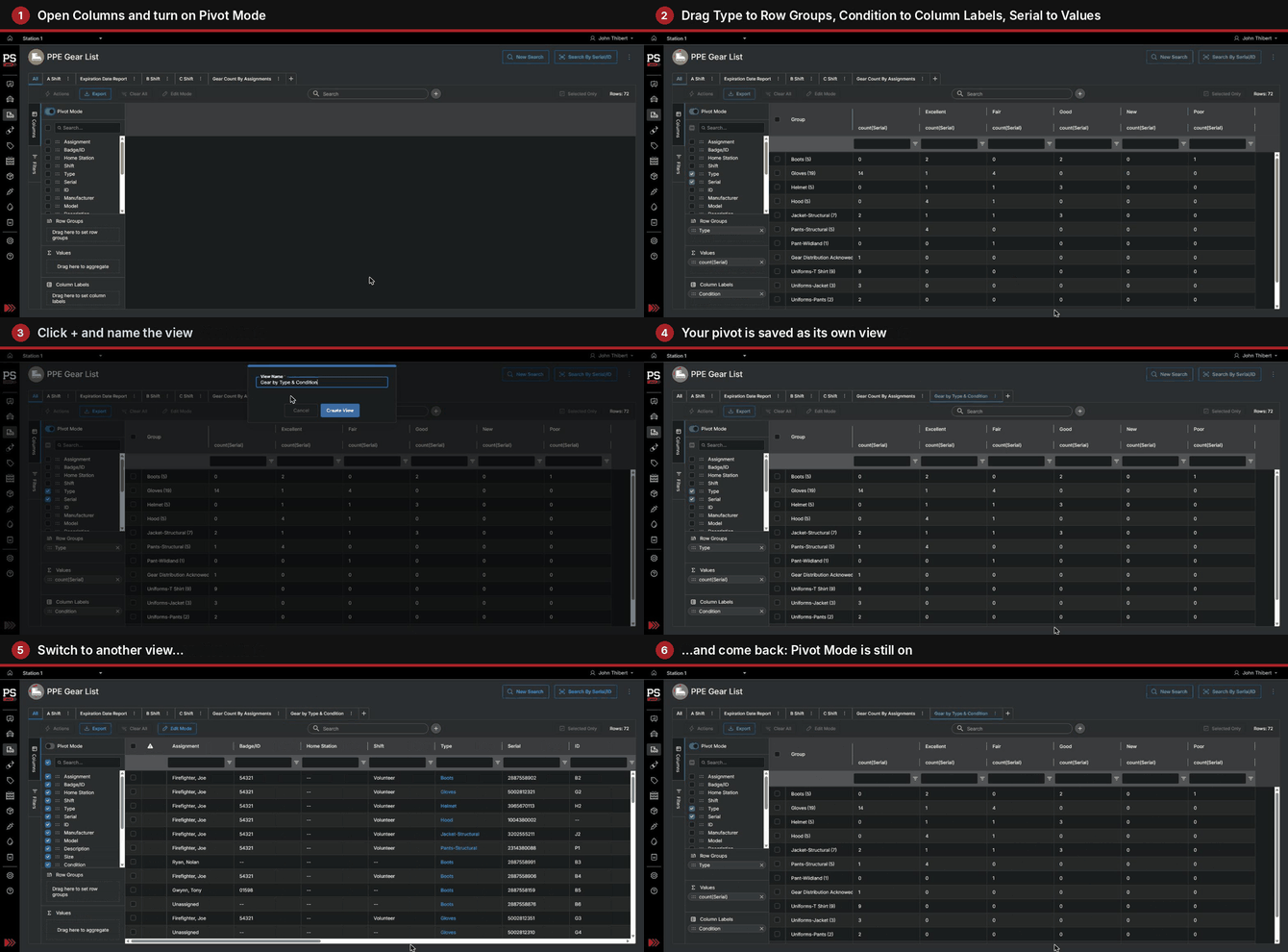
When you save a custom view with Pivot Mode turned on (in the grid's Columns panel), PSTrax now restores that view with Pivot Mode still on. Previously the view came back with its pivot columns assigned but Pivot Mode switched off, so you had to turn it back on each time. This update lets you build a pivot-style summary once and return to it with a single click.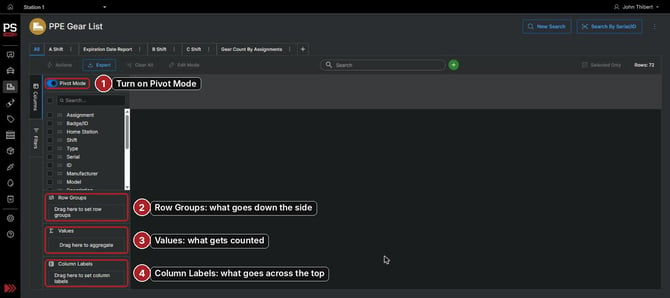
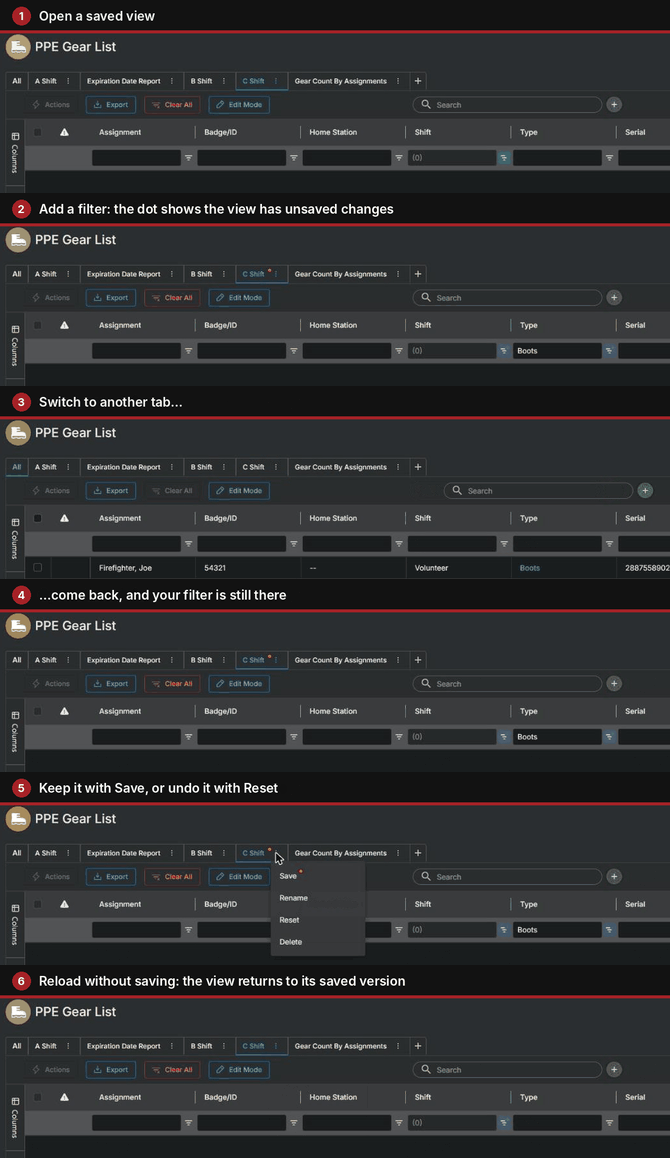
Smarter saved views on the PPE Gear List
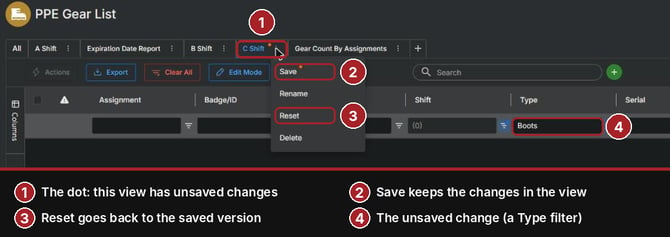
Saved views on the PPE Gear List now use the same view management as PSTrax's other modern grids, which keeps an unsaved change from lingering on a view and hiding its results. Unsaved changes still carry over as you switch between view tabs and are cleared when you reload the page, so the list always reopens on the views you saved. This update keeps your saved views predictable, so the gear list you open is the one you set up.

Lightning-fast Fleet Compliance Reports for all departments
We’ve significantly optimized the Fleet Compliance Report to ensure it loads quickly, even for large, multi-station departments. You can now access your fleet's real-time status in seconds rather than minutes, providing a smoother and more reliable experience when managing your agency's compliance data.
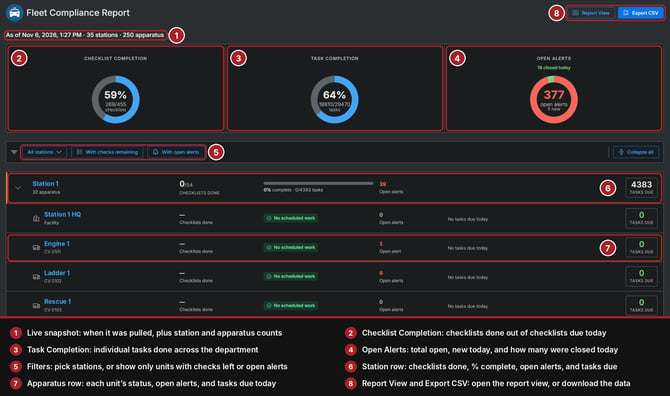
📌 Your fleet’s compliance status now loads in seconds — Catch compliance gaps as they happen and get them corrected before they become issues.
Other features, enhancements, and bug fixes
Vehicle & Station
- Schedule asset checks at specific times of day: We fixed an issue where a vehicle task set to "Daily at specific times" could not be saved when "This is an Asset Check" was set to Yes. These tasks now save normally, record to your vehicle logs as usual, and add a time-stamped entry to your Asset logs for each scheduled occurrence. This fix lets you put on-truck asset checks on the same precise daily schedule as the rest of your vehicle tasks.
- Schedule SCBA checks at specific times of day: We fixed an issue where a vehicle task set to "Daily at specific times" could not be saved when "This is an SCBA Check" was set to Yes. These tasks now save normally, record to your vehicle logs as usual, and add a time-stamped entry to your SCBA logs for each scheduled occurrence. This fix lets you keep on-truck SCBA checks on the same precise daily schedule as the rest of your vehicle tasks.
- Fleet Compliance Report access that follows your Vehicle & Station permissions: The Fleet Compliance Report now appears in the Vehicle & Station menu for every user with User or Admin access to Vehicle & Station, regardless of their Dashboard permission.
Assets, PPE & SCBA
- See which serial numbers weren't found: When searching the PPE, SCBA, or Assets gear list by Serial/ID, an "IDs Not Found" window once lists the serial numbers or IDs that didn't match, alongside the results that did. This helps you spot typos and missing gear right away instead of assuming everything on your list was found.
- Start a fresh Serial/ID search with one tap: The Search By Serial/ID window on the PPE Gear List keeps your previous search, so you can add or modify your search quickly. But now a new clear (X) button allows you to remove the old values in one tap, which makes back-to-back searches much easier on a tablet or touchscreen. This update saves time for departments that run several gear searches in a row, like when issuing spare gear.
Supplies & Procurement
-
Accurate unit counts after a Usage/Transfer: We fixed an issue where recording usage and restocking a unit in the same action (a Usage/Transfer) logged the usage against the supply container instead of the unit.
- Bound Tree items go through on your purchase orders: In certain circumstances, items linked via integration from Bound Tree to PSTrax could not be submitted on a purchase order, prompting the user to remove and re-add those items to the cart. This has been corrected so the cart and purchase order are in sync.
- Better error handling when submitting purchase orders. In some cases when attempting to submit a purchase order with items from from our integration partners (Life-Assist and Bound Tree), the order would fail to submit, with items either staying in the cart with no message or showing a generic "Server error." Carts that mix Life-Assist and Bound Tree items now create one purchase order per vendor, and if a vendor submission ever does fail, you see an error naming that vendor right away.
- Purchase order status you can trust for Life-Assist orders: We worked with Life-Assist to fix an issue where Life-Assist purchase orders were marked "Received" the moment they were submitted, while the vendor status showed "Status unavailable." Newly submitted orders now stay in your Open Orders until the vendor confirms them or you receive the order, so an order that never reached the vendor no longer looks the same as one that was delivered.
Blood Products
-
Saved Blood Products views that open the way you left them: Saved views on your Blood Products pages now reopen exactly as you saved them. Previously an unsaved change could linger behind a saved view and make a saved filter show "(0)" with no matching rows, even though the view itself was intact.
Fleetio Integration
- Alerts resolved in Fleetio stay editable in PSTrax: We fixed an issue where resolving an issue in Fleetio could break the linked alerts in PSTrax, freezing the alert Edit window and preventing you from adding notes or closing the alert. Alerts updated by Fleetio now open, edit, and close normally. This fix restores normal alert handling for departments using the Fleetio integration and keeps your maintenance workflow moving between the two systems.
Platform-wide
- Equipment and Compartments data is back in the Developer API: The Developer APIs Equipment and Compartments endpoints are available again — returning results in pages so departments with large fleets get reliable responses. This update restores access for partners and in-house tools that pull your vehicle equipment and compartment lists, without timeouts on large fleets.