
New Fleet Compliance Report: Ensure operational readiness with one view
The new Fleet Compliance Report is now available under the Vehicle & Station menu, providing a real-time view of every checklist and task scheduled across your department for the day.
Key Features
- At-a-Glance Dashboard: View high-level metrics instantly with three summary tiles at the top of the department page: Checklist Completion, Task Completion, and Open Alerts.
- Flexible Drill-Down: Data breaks down by station and apparatus. Expand any row in place or drill directly into an individual unit to view pending tasks.
- Targeted Filters: Easily narrow your view to specific stations, or filter to display only apparatus with remaining checks or active alerts.
- Data Export: Export compliance reports seamlessly at either the department or station level.
Expanded Log-In Landing Page Options
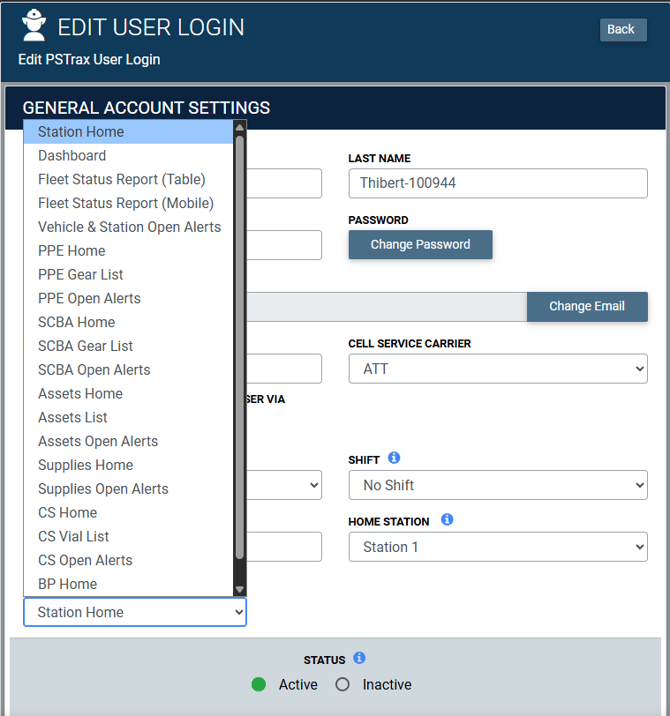
Users can now choose from over 20 starting points across the platform to land directly on the screen they need at the start of their shift.
Key Features
- Expanded Navigation: Choose from over 20 starting locations, including your personal Dashboard, Fleet Status Report, PPE or SCBA gear list, Supplies home page, CS vial list, Blood Products inventory, or any module’s Open Alerts page.
- Smart Visibility: The dropdown dynamically filters options to show only the modules enabled for your department and accessible with your permission level.
- Preserved Settings: Your existing landing page selection will remain unchanged. Station Home remains the default selection for new accounts.
Automatic Lot & Expiration Tracking for Bound Tree Orders
When receiving Bound Tree orders in PSTrax, lot numbers and expiration dates now populate automatically from the shipment data into your receiving flow, eliminating manual entry and ensuring accurate inventory tracking from day one.
Key Features
- Automated Data Population: Line-item details provided by Bound Tree automatically fill the existing Lot # and Exp. Date fields in your receiving workflow.
- Flexible Item Support: Automatically captures information whether an item includes a lot number, an expiration date, or both.
- Eliminated Manual Entry: Removes the need to manually transcribe tracking data from physical packing slips, speeding up the receiving process and reducing human error.
- Immediate Inventory Accuracy: Guarantees precise tracking and compliance details are captured in your inventory records the moment stock is received.
Other features, enhancements, and bug fixes
Vehicle & Station
- Auto-save working again across your checklists: We fixed an issue where background auto-save stopped persisting your inputs on the Apparatus Schedule View, As-Needed checklists, and Supplies inventory counts — refreshing the page would revert dropdown selections, checkmarks, notes, and adjusted quantities. Auto-save now writes your changes in the background again on all three, so progress is retained without a manual submit. This fix protects in-progress work from being lost to a refresh or an interruption, which matters most for crews logging quickly between calls.
- Attachments stay with your logs: We fixed an issue where images attached to a l og submission intermittently failed to save — the log entry recorded correctly, but the attachment was missing from the history view, often on every few entries. Attachments now save and appear reliably in Vehicle & Station Logs.
- Clean Pass/Fail notes in Recent Task History: We fixed an issue where the Recent Task History pop-up displayed raw HTML around Pass and Fail entries in the Notes column for departments with "Display Pass/Fail in Logs" enabled. Notes now render as clean, formatted text in the history view, matching how they already appeared in your main logs and exports.
PPE / Assets / SCBA
- Barcode scanning in every SCBA and Asset dropdown: The search field inside SCBA-style dropdowns now appears no matter how many items are in the list. Previously the field was hidden whenever a dropdown held fewer than five items, which blocked barcode scanning on short lists — now you can scan or type to filter packs, cylinders, regulators, and assets on both Scheduled and As-Needed SCBA and Asset checks. This update gives departments a consistent scanning workflow across every equipment check, removing the manual-selection fallback on smaller inventories.
- Empty slots stay empty after a "No Gear" check: When you log a position as "No Gear" on an SCBA or Asset check, the next check now opens that slot as a blank search field instead of pre-filling the asset that used to be there. The slot stays empty until you explicitly search for and assign a new ID or serial number, on both Scheduled and As-Needed checks.
- A properly aligned Batch menu on iPad: We fixed an issue where the Batch action menu on the SCBA Full Schedule page rendered detached on iPad Safari, with the action options floating over the data rows well below their white background panel. The menu now anchors directly beneath the Batch button and keeps every option inside the panel, in both portrait and landscape.
- Comments post once on Assets open alerts: We fixed an issue where adding a comment to an alert on the Assets Open Alerts page could submit it several times, leaving the same note repeated with an identical timestamp in the Description & Comments history. Comments now post exactly once.
Supplies
- Supply alerts name the right container and stay consolidated: We fixed an issue where logging items below par generated alerts labeled "unknown" instead of the container name, and split a single container's shortages into a separate alert for every sub container. Below-par items are now linked to their parent container, so alerts show the real container name and arrive as one consolidated alert listing every item that needs restocking. We have also repaired the alerts already affected — existing "unknown" alerts have been relabeled with the correct parent container name and re-merged into a single alert per container.
- A working search when issuing supplies to a user or unit: We fixed an issue where the search field on the Supplies "Issue to User or Unit" screen accepted your typing but never returned any results, leaving you to scroll the full list to find the right person or apparatus. Searching now returns matching users and units, and the results are selectable. This fix restores expected search behavior when issuing usages, cutting the time it takes to attribute supply usage to the right crew member or apparatus.
- Reliable expiration dates on your restock pages: We fixed an issue where typing an expiration date without slashes on the Supplies restock pages silently saved the wrong date. Those fields now use the same datepicker as the Vehicle Check checklists, so you can type dates as 4 digits (MM/YY), 6 digits (MM/DD/YY), or 8 digits (MM/DD/YYYY) and they auto-format into MM/DD/YYYY as you type. The 4-digit format is especially handy for supplies, since many expiration dates list only a month and year — enter 02/26 and it expands to 02/28/2026 (the last day of that month) as soon as you tab, press Enter, or click out of the field, and it's leap-year aware, so 02/28 becomes 02/29/2028. Invalid entries now clear instead of quietly rolling over to a wrong date, and mobile devices bring up a numeric keypad for the field. This applies to both manual restocks and restocks against a procurement order.
- Faster supply transfers between stations: Supply transfers now complete noticeably faster. We reworked how PSTrax checks par levels after a transfer so the system evaluates every affected unit in a single pass instead of running a fresh round of lookups for each one — the more units your transfer touches, the bigger the difference you'll notice.
Controlled Substances
- Medical Director name choices now save: We fixed an issue where adding a name under Medical Director Name Choices in Controlled Substances settings failed with a database error, leaving the dropdown empty and forcing crews to type names into the "Other" field during checks. Names now save immediately and appear in the configuration list, and the Controlled Substance check form populates the dropdown with every active name you've configured.
- Accurate next-due dates on Controlled Substance schedules: We fixed an issue where logging an as-needed Controlled Substance inventory check shortly before a scheduled check pushed the next due date out by two intervals instead of one — a container on a 7-day schedule would skip a week entirely. Next-due dates now advance by a single interval from the scheduled check, so your compliance calendar stays sequential.
Blood Products
- Accurate Blood Products check counts by station: We fixed an issue where the Blood Products badge on the Checks dashboard counted containers that weren't assigned to your active station, showing a pending check that vanished the moment you clicked into it. The badge now counts only containers assigned to the station you're working from, plus any container set to display in all stations.
Platform-wide
- A dependable log-in through station selection: We fixed an issue where signing in and selecting a station intermittently returned you to the "Enter your username" screen, forcing a second log-in before you could get to work. Your session now persists through station selection, across every browser on both desktop and mobile. .
- Clean PDF exports of your open alerts. We fixed an issue where raw HTML tags appeared in the Description & Comments column of PDF exports from the open alerts and alert archive pages across every module. Exported PDFs now render line breaks and formatting properly, matching what you see on screen.