
Get Your Supplies Data Faster
We've delivered a significant performance overhaul to the Supplies Module. This update focuses on one thing: speed. Whether you're auditing inventory, searching for transactions, or tracking trends, your data now loads in seconds—no more timeouts or waiting for the "loading" wheel.
Optimized pages include the Logs, Logs by Item, Below Min, Expiration Date, and Supplies Below Min, Expiration Date, and Trend reports.
We also enhanced the scheduled Inventory Count page to handle large inventories with hundreds (or thousands) of items across multiple containers / subcontainers without lag.
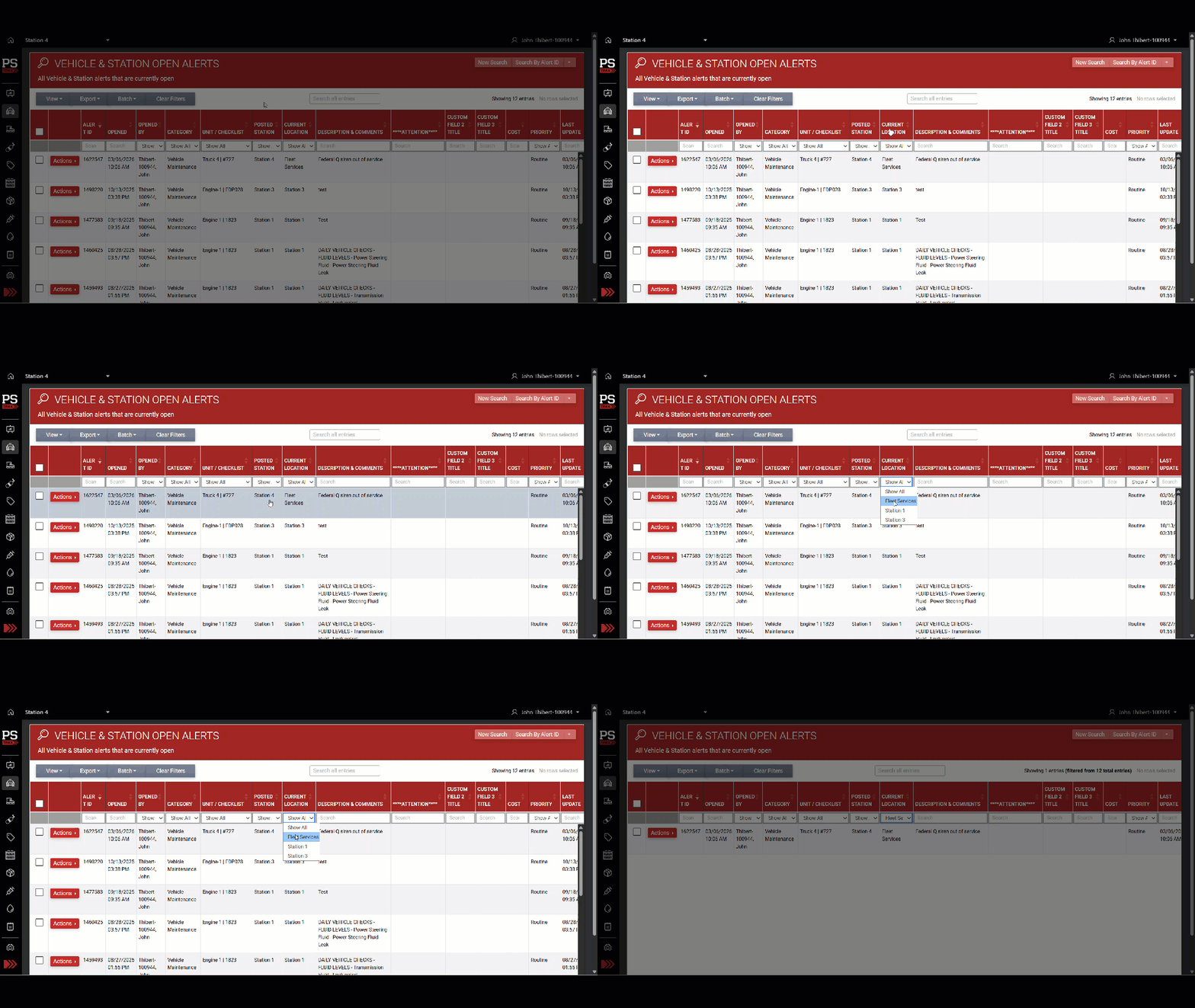
See Real-Time Vehicle Station Assignment on Open Alerts
You can now view the current location of each vehicle directly on the Vehicle & Station Open Alerts page. A new "Current Location" column appears next to "Posted Station," showing where the vehicle is right now—even if it has moved since the alert was posted. This helps fleet easily find alerts on vehicles based on where they are physically located.
New Columns in the Fleet Status Report
We’ve reorganized the Fleet Status Report so that key vehicle metrics—such as Odometer, Engine Hours, Pump Hours, and Aerial Hours (and their “Next Due” values)—now appear directly after the “Schedule Status” column. This makes it easier to review important fleet data at a glance.
.png?width=670&height=272&name=fleet_status_report_annotated%20(1).png)
Other Features, Enhancements & Bug Fixes
Vehicle & Station
- Improved "Service Due" Alert Experience for Mileage & Hours: We've made several enhancements to how Service Due alerts work across the board. When an odometer or engine hours threshold is reached — triggering an alert — this automatically creates a Service Due alert with all relevant details pre-filled for consistency. You'll also now see "Next Due" hours or odometer values displayed directly on the final log screens when recording vehicle data, keeping important maintenance thresholds visible throughout the logging process without needing to navigate away. In your Alert Categories & Recipients settings, a new tooltip explains that this category is automatically managed by the system and can't be manually reordered or edited like custom alert categories can. Additionally, the "Update Next Due" field in service alert modals no longer displays hardcoded unit labels, keeping the interface clean and flexible for all organizations.
To learn more about the new Service Due feature, check out this article. - Combine Alerts Now Works with Odometer and Hours Tasks: You can now combine multiple tasks—including those with odometer or engine hours readings—into a single alert during vehicle checks. If an odometer or hours entry triggers an automatic alert, the system will guide you through a step-by-step process to log both the combined manual alert and any required auto-alerts.
PPE / SCBA / Assets
- "Set an Alert" Now Available for As-Needed Asset Checks: You can now flag equipment issues or defects during As-Needed Asset On-Truck Checks using the "Set an Alert" checkbox—just like in Scheduled checks. This makes it easy to report problems right when you find them, no matter which workflow you use.
- Unassigned Filter Now Shows Only Unassigned Gear: We fixed an issue where selecting "Unassigned" in the PPE Admin Search Schedule would incorrectly display all gear, including items assigned to specific users. Now, when you choose the "Unassigned" filter, you’ll only see gear that hasn’t been allocated to anyone—making it much easier to identify and manage unassigned equipment.
- PPE Gear List Remembers Your View: We fixed an issue where your column visibility settings in the PPE Gear List would reset every time you left and returned to the page. Now, your customized view stays just the way you set it for your entire session.
Supplies & Procurement
- Flexible Scheduling for Supply Checks: You can now schedule supply container checks at custom weekly intervals—up to 52 weeks! This means you can easily set up quarterly, bi-monthly, or even annual supply inspections without workarounds. The system will save and display your chosen interval, making long-term planning simpler and more efficient.
- Lot Number Tracking Now Saves Instantly: We fixed an issue where the "Track Lot Number" option was not being saved when adding a new supply item.
Blood Products
- Blood Products Card Now Shows Pending Checks: The Blood Products card on your homepage has been redesigned with a split-pane layout. You’ll now see the number of scheduled checks due at a glance, plus a clear “As-Needed Check” option—making it easier to stay on top of compliance tasks without extra clicks.
- Log Inventory Checks with Zero Products: You can now complete inventory checks on containers even when no blood products are present. Simply check the new box to confirm a quantity of zero, and your event will be logged as expected.
- Transaction Logs Now Load Instantly: We sped up the Blood Products Transaction Logs page to load information more quickly - especially for agencies with a large number of records. The page now loads in seconds, and you can quickly browse, search, and filter your transaction history without delays.
- Scheduled Checks Display Accurate Due Date: We fixed an issue where scheduled checks were showing outdated or incorrect due dates on the Blood Products Home and Manage Schedules pages in certain circumstances. Now, after you complete a scheduled check, the next due date updates correctly and always reflects the next required check.
- Custom Field Labels Now Display in All Blood Product Events: We fixed an issue where your custom labels for standard blood product fields (like Item ID or Exp Date) were not appearing during inventory checks, transfers, and administration events. Now, your chosen terminology is shown consistently across all event steps and views.
Other
- Department Checklist Logs Load Instantly Again: We fixed an issue that caused Department Checklist logs to get stuck loading or show an error when searching by reference. You can now view, search, and export your department logs without any delays or errors.